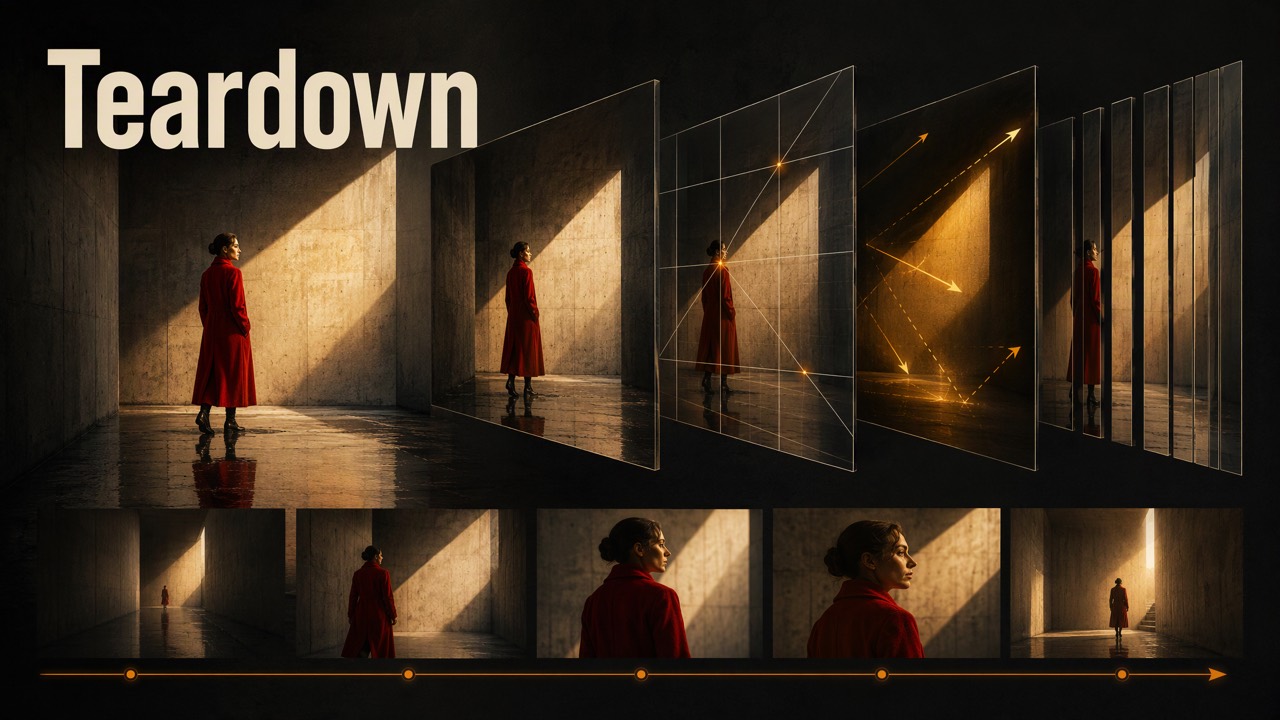
Provide: A file/link, what to understand or borrow, and any subsequent creative goal.
Receive: Source-grounded methods and elements. Video: HTML/data with segments, elements, groups, overall reading. Other formats: appropriate analysis documents.
Get execution resources
For HTML video reports: this template packages JSON/media; no ZIP for method-only use.
Download bundle · 20261105.1 · 21,573 bytes
SHA-256: 2b936abc22b8fed4f3cdcc617061709d022ff9e69c22ac892bf4e2d5ddd48c1f
Verify size/SHA-256; extract as teardown-report/. Keep assets/ beside scripts/; paths/placeholders below resolve here. Reuse a matching copy; use its scripts.
Requires Python 3 standard library; uses system fonts.
Tools and methods
The host analyzes actual material; media tools inspect, extract frames, process clips. Use the bundled template/Python 3 standard-library renderer, not a redesigned video report.
- .
- .
- .
- .
- .
Workflow
- Retain the goal, obtain material, establish scope/sources/access limits. Read the applicable method; ordinary reading/transcription uses host tools.
- Explain sequence, visuals, motion, sound with times/frames/source positions. Separate observation, implementation hypotheses, and adaptation advice.
- Link elements/occurrences with IDs such as REF-E01. Cite grouping evidence; similar composition does not prove one camera. For marketing only, label actual
hook,turn,proof,ctafunctions; do not invent missing stages. - Deliver HTML via the downloaded Report bundle; otherwise provide structure, techniques, elements, and relevant adaptations. Distinguish identified elements from asset files actually obtained.
Called by another inspiration
Reuse its goal, scope, and analysis. Add only requested passages/fields/tags with source positions and element IDs. Package HTML as needed; do not restart analysis. A later storyboard may map REF-E01 to target E01. The caller chooses production tools.
Acquire Material
Read supplied files directly; retain originals and process copies. For links confirm video/range; record source, file, resolution, duration, acquisition time.
Choose an acquisition method based on the source and the tools actually available. Computer Use opens the work, confirms its version, and finds accessible media; file download tools save the media, and FFmpeg / FFprobe process and validate it. Teardown supplies a method, not a download API.
- Supplied files or direct media links: Read files directly. Download direct media URLs with a file download tool; opening a platform page is unnecessary.
- Douyin and Xiaohongshu work pages: Prefer authorized Computer Use to open and play the work and confirm the intended, complete version. Check the platform's available save controls or media-resource access explicitly supported by the current browser tool. If it can list loaded media, use the actual observed MP4, separate audio/video tracks, or other processable media URLs. A
blob:player URL alone does not establish that acquisition is impossible; do not assume every browser can list or export media. - Save media found in the browser: Use an allowed download tool or Python to request the observed resource URL, setting ordinary User-Agent / Referer headers when needed. If an in-browser download hits a CORS restriction, use a file download method where tool permissions and authorization allow. Merge separate tracks with FFmpeg and retain originals. Do not bypass login or permission denials, extract browser credentials, or guess unobserved media URLs.
- Other platforms or alternatives: Choose Computer Use, a platform connector / API / MCP, or a tool such as yt-dlp according to verified support. Reuse accessible media returned by an existing integration without repeating browser steps. yt-dlp is not a universal prerequisite; one tool's failure does not establish that all other routes are unavailable.
- When user assistance is needed: Request specific missing files only after applicable, permitted routes have failed or are demonstrably unavailable; state attempts, errors, and remaining limits. If login or CAPTCHA requires the user, explain the required action. Continue analyzing available files rather than blocking all work on one failed item.
Check actual playback, duration, aspect ratio, dimensions, frame rate, and audio tracks. A cover/description/partial frames do not establish complete video or audio analysis. State coverage. After observation fails, check files before reacquiring/reporting.
Prefer original images; inspect real website interactions in an available browser. Use document connectors, record revision/time; request files if access is unavailable. Acquire audio as media, retaining the sound/transcript time origin.
Images, Audio, Documents
Choose fields for the user's goal; deliver structure, techniques, elements, and source positions. Ordinary reading/extraction/transcription uses host tools.
Images
Observe subject/information, composition/eye guidance, whitespace, foreground/background, light, material, palette, typography, hierarchy. Across sets, compare rules/variations in angle, scene, selling point, and layout. Record element appearance, position, related images. Do not judge illegible thumbnail details.
Audio
Use actual times for sections, energy, accents, pauses, and speech/music/effects/ambience roles. Mark editing events; measure BPM or label estimates. Transcripts cannot establish sound. Separate transcription/lyrics from listening; do not describe unheard timbre, rhythm, or mixing.
Documents
Analyze organization, audience, tone, arguments/examples, and processes/numbers/comparisons suitable for visualization. Preserve fact/quote positions; separate source conclusions from suggestions. Brand manuals follow , grounded in actual rules. State partial reading coverage.
Report
Video HTML data/design/interaction/delivery; analysis: . Other formats are outside this template.
Generation
Use template, styles, script. Render analysis JSON. Retain template structure/design/behavior; replace data/media.
python3 <Teardown-inspiration-directory>/scripts/render_report.py <analysis.json> <delivery-directory>/report.html
Python standard library only. Validates IDs, ranges, associations, media; embeds styles, behavior, brand and media into one HTML by default. Preserve existing outputs unless intentionally using --overwrite.
For large media, use --media copy: brand remains embedded; video/frames are copied beside HTML with relative references. Deliver both together. JSON media paths resolve from the JSON directory. Obtain real files first, not temporary signed links or machine-specific absolute paths.
example-data.json demonstrates structure; replace sample text with actual analysis and unavailable media with null.
Fixed design
- Fixed top brand bar with supplied image in full proportions. Below: title, media information, source access, data download.
- Paper
#F4F2ED, panels#FFFEFA, body#1B1B19, secondary text#77766F, borders#DFDCD4; orange#E85D3Dfor emphasis/selection, blue#4778D7for links/relationships. Role colors are template-mapped. - Use system serif, sans-serif and monospace fonts; no font files are required.
- Desktop baseline 1440 px: bar 72 px, horizontal padding 40 px, section gaps 24 px, radius 10 px. Main title 42/58 px, section heading 23/36 px, analysis 13/21 px. Styles define responsiveness.
- Segment view starts with a one-sentence takeaway, then source/evidence. Expand text/panels; never truncate analysis to sample heights.
Four views
Keyframes support browsing/evidence; judge motion/transitions from moving footage. Show complete frames and preserve portrait/square proportions.
Data contract
Segments: id, title, start, end, frame, fields, elements. Seconds, sorted, non-overlapping. Gaps mean unanalyzed intervals. fields maps labels to plain text in reading order (visual, motion, transitions, sound, purpose as applicable), distinguishing observation/hypothesis/advice. elements references source IDs. Marketing only uses role = hook, turn, proof, cta; omit otherwise. A segment can contain several cuts: call the total analysis segments, not shots.
Elements: id, name, frame, traits (or literal legacy fields['关键外观或结构特征']), shots. Element shots and segment elements must be reciprocal; IDs remain stable across shots. Missing frames do not imply extracted assets.
Groups: id, name, basis, shots; at least two evidence-supported segments. Groups describe observable links, not proven physical cameras. Camera coordinates/focal lengths are not required.
Sections: title, paragraphs (plain-text array), optional rows (table rows, first header). Download the same analysis shown. No HTML/scripts/inline styles in text.
Behavior
- Timeline/thumbnail clicks seek and select analysis; normal playback follows time. Play-segment stops at its end; loop repeats only that segment. Changing views pauses video.
- Element IDs open elements; occurrence links/group thumbnails return to segments and seek. All views share IDs/times.
- Retain true time proportions. Short labels may hide but remain navigable through thumbnails/IDs. Mark unanalyzed gaps.
- Wrap long titles; expand analysis/descriptions. Horizontally browse thumbnails/groups rather than shrinking beyond recognition.
- Below 900 px, stack segment panels. Phones retain branding, all four views, player, complete analysis. Hide side contents on narrow screens without distorting source proportions.
- Mark sound “not checked/not actually heard.” Explain empty elements/groups, not sample-fill. Without video, show real saved frames and the reason; disable playback. Show missing states when frames are unavailable.
Checks
Actually open the output: four views, media, segment selection/stop/loop, element/group links, data download. Inspect desktop and phone sizes for long text, panel height, brand proportion, overflow; portrait media must remain complete.
Confirm page/data agreement, visible sources/limits, no missing files. Move resource-directory deliveries and reopen to test relative paths. Single-file delivery must have no external font/script/media dependency. Record checks actually passed; presentation success does not independently verify analysis conclusions.
Video Breakdown
For film, marketing, talking heads, screen demos, motion graphics, and mixed work. Analyze cinematography/performance/set design alongside layers, timing, editing, and sound to inform generation, code animation, and compositing.
Standalone video analysis defaults to interactive HTML with segments, key elements, useful cross-shot groups, and relevant specialized analysis. Use , retaining data. When called by another inspiration, return only its requested scope and package HTML if needed. Separate source analysis from adaptation design: intended tools/guesses are not facts. Acquisition: .
1. Scope
State whole video or interval, whether sound was heard, and whether detail is legible. Disclose missing audio, unavailable frame stepping, absent subtitles, etc.; affected judgments are unknown/estimated.
2. Watch, then inspect
- Watch the full requested range: purpose, opening, development, turns, ending, audiovisual relationships. Frames/contact sheets locate detail; revisit real motion.
- Identify marketing (launch/ad/brand/feature demo) and label actual functions only.
- Divide shots/meaningful segments; record start/end/duration. Live action: cuts/continuous action. Motion graphics: layout/element/state changes within shots; each entrance is not a cut.
- Identify resemblance drivers—key shots, recurring graphics, signature transitions, visual ideas, sound anchors—and inspect these more densely.
- Observe full movement: start, acceleration, peak, hold, exit; before/after action/camera states. Stills reveal composition; sequences/playback reveal motion.
- Group recurring subjects/scenes/angles/compositions/methods as needed, explaining correspondence, variation, and connections.
3. Analysis table
One row per shot/meaningful segment across actual coverage. Use source time and actual frame rate; do not invent precise numbers.
- Role: Marketing
hook/turn/proof/cta, possibly spanning rows; blank/omitted otherwise. - Visual: Subject, scene, shot size, composition, main layers, text/information, meaning.
- Elements: Stable inventory IDs connecting occurrences.
- Motion: Character/object action, camera, graphic/text changes, holds/order. Distinguish camera, asset, and crop/zoom motion.
- Editing: Actual cuts, matches, continuous movement, occlusion, dissolves, etc.
- Sound: Speech/narration/music/effects/ambience aligned to action/cuts/text/beats. Unheard sound is unchecked.
- Purpose/reuse: Narrative/information role and resemblance driver. For marketing, state the viewer gain. Label adaptation advice.
Cite saved frames/revisit-able times, not unavailable images.
4. Elements and groups
Inventory useful cross-shot/production elements, not isolated descriptions: people, products/props, scenes, recurring graphics/UI; sound identity/effects when relevant. Give source IDs such as REF-E01, cite in the table, consolidate recurrence, and note timed appearance/state changes.
Specify invariants: appearance, shape/marks, scene layout, component structure, adjacent states. Illegible details stay unknown; never invent identity, brand, hidden structure.
For groups, cite shot IDs/evidence according to purpose: dialogue reverse angles, product viewpoints, shot sizes, repeated layouts/motion. Explain invariants, variations, alternation. Similar backgrounds/compositions do not prove a shared physical camera. Describe observable view/spatial relationships without inferring coordinates/focal length.
5. Specialized analysis — relevant parts only
Marketing: List actual function order/duration shares, e.g. opening 4 s → three proof beats totaling 18 s → ending 3 s. Explain attention, proof methods, final takeaway/action. Do not invent stages.
Film/people/scenes: Appearance, wardrobe/props, action/goal, blocking, eyeline, foreground/background, observable space, shot size/direction/movement, light/color/material. Explain recurrence/change through groups and continuity of people, scene, action, objects.
Layers/text/code motion: Layer order, positions/sizes, opacity, masks, blur, shadow, glow, texture. Frame-relative measurements are measured/estimated explicitly. Signature actions need entrance/hold/exit, direction/path, duration, stagger, easing/overshoot; identify simultaneous/static elements and independent container content. Uncertain fonts are features/candidates, not identifications.
Frame density: at least every 0.5 s for motion graphics, 0.1–0.2 s for fast passages; separately save settled frames marking motion landings. With music/rhythm, measure BPM or beat intervals and record which beats/actions align to hits, whooshes, landings. Otherwise record action intervals. Rhythm often drives resemblance more than isolated motion detail.
For code recreation, label implementation hypotheses; offer two candidates when uncertain:
Sample palette codes into element records.
Visual ideas/complex transitions: Participants, trigger, result (scale, occlusion, handover, replacement, crossing frame edges). Distinguish continuous action, occlusion cut, compositing; uncertain implementation remains inference.
Real assets/screens: Type, specificity, source clues, treatment. Product demos also need operation order, cursor/click/hover, UI states/results for capture/recording. Adapted factual/operational proof must use corresponding real assets.
Editing/speech/sound: Section order, shot-length changes, repetition/pauses, audiovisual coordination. Talking heads: narrative/tone; music-led: rhythm/cuts; effects-led: event/sound alignment. Record subtitles and animated text separately: content, position, appearance rules, time origin.
Measure with available tools and cite the basis. Never invent parameters, algorithms, software, or models for apparent completeness.
6. Report and handoff
Deliver sources/scope (file/link, media, interval, limits); overall structure/core method/resemblance drivers (marketing functions if relevant); analysis table; elements; relevant specialized evidence (real frames/details/sound times); adaptations (retain/replace/adjust, generated/code/real assets needed, missing inputs). Caller chooses production routes based on available tools.
For HTML, map this to Report's four views. Table columns become selected-segment fields, not necessarily a wide table. Groups require evidence or empty states. Keep template system-font styling/layout/interaction, verifying actual media/navigation. Production checks against report/data; a report is not a newly produced video.
Website Breakdown
For the user's intended content/design/interaction reference, record claims, presentation, and actually available assets. Ordinary extraction uses host reading tools.
Content and visuals
- Follow page order: claims, supporting facts, numbers, customers, action entry points, source positions. Label only actual
hook,turn,proof,cta. - Capture the requested layout, hero, whitespace, hierarchy. Overlap long-page captures; compare fixed viewports. One first screen is not the whole site.
- Read actual available styles: colors/roles, fonts/weights, sizes, borders/shadows, components. Otherwise describe visible traits without guessed HEX/font names.
- Inspect actual interaction triggers, before/after states, timing/feedback; screenshots alone do not establish scroll/hover/state behavior.
Delivery
Provide content structure, design reference, assets with URLs/page positions/actual files. Distinguish saved from identified logos/images/screens/video; use capture/ if useful. Explain transferable rules versus dependencies on source density/interactions. Record login, dynamic loading, coverage. Do not force websites into the video HTML template.